Gi en mann et bål, og han er varm resten av kvelden, men kast ham på bålet, og han er varm resten av livet.
– Terry Pratchett (fornorsket av Einar Jørgen Haraldseid)
Det er nesten ufattelig. Vi skriver ikke engang november, og jeg er på plass med en revidert julegaveønskeliste. Jeg juksa litt: tok lista fra i fjor og fjernet det jeg har fått og/eller skaffet meg på egenhånd siden sist.
Jeg kommer til å oppdatere lista etterhvert som jeg kommer på nye ting.
I upgraded to Fedora 22 on my ThinkPad X240 today, and immediately ran into a surprising and infuriating problem: My middle mouse button stopped working as a mouse button. Instead, it started behaving as a scroll button. I don’t need a scroll button, I need a middle mouse button.
The behaviour of the middle mouse button is traditionally governed by the option «EmulateWheel» in xorg.conf, and the Internet is full to the brim of examples for how to *enable* this behaviour. Thus if you do a Google search on how to *disable* it, you end up finding instructions for disabling it. But that’s irrelevant, Fedora 22 has stopped honouring this setting anyway.
The only way I found to get my middle mouse button back was this command:
xinput --set-prop "TPPS/2 IBM TrackPoint" "libinput Scroll Method Enabled" 0 0 0
Now I just need to stick that into a shell script and run it on logon. *barf*
I’m typing this up in English in case it turns up in someone’s Google search results.
I wanted to check up on my TLS certificate on one of my Apache vhosts today, using the good old command:
openssl s_client -showcerts -connect your.domain.tld:port
but ended up receiving the self signed certificate that ran on the server’s default domain. That wasn’t very useful, but I was reminded that I had seen someone mention a different tool in a blog post ranting about certificate caching lately. In an effort to avoid having to go through all the convoluted brain racking and Google searching the next time I want to find said tool, I’m leaving this note for myself here.
The tool in question is called gnutls-cli, and is part of the gnutls-utils package on Fedora or in gnutls-bin on Debian/Ubuntu. The syntax is very nice:
gnutls-cli your.domain.tld -p port
and it handles vhosts and stuff like that. It connects to port 443 by default, so the port part can usually be omitted.
Det drar seg til mot jul igjen, og her kommer årets julegaveønsker fra meg for de som måtte ha noe interesse av det. Disse gaveønskene fungerer forsåvidt fint utenfor jul også. Oppdatert 30. april 2015.
For seks år siden kjørte jeg en liten uvitenskapelig undersøkelse på IRC-kanalen #kopweb på EFNet (der jeg henger fortsatt), hvor jeg sjekket hvilke IRC-klienter som var i bruk. I 2011 gjentok jeg forsøket, og nå i kveld gjennomførte jeg undersøkelsen for tredje gang.
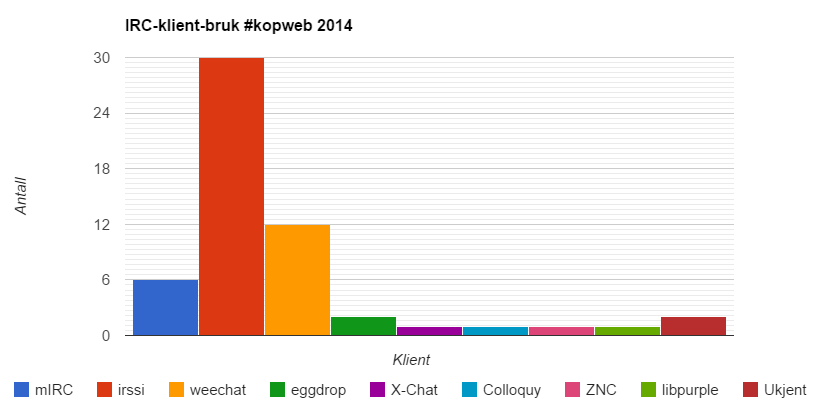
Jeg merker meg at mangfoldet av klienter har minket en del siden sist, og at WeeChat har gått fra å ha én enslig bruker i 2011 til å være den nest mest populære klienten i 2014.
Ellers fikk jeg også denne gangen inn et innslag av «mirken 0.1.4-svn – running on C64». Jeg mistenker at det er samme person som i 2008.
| Klient | Antall |
| mIRC | 6 |
| irssi | 30 |
| weechat | 12 |
| eggdrop | 2 |
| X-Chat | 1 |
| Colloquy | 1 |
| ZNC | 1 |
| libpurple | 1 |
| Ukjent | 2 |
Most, if not all, day to day management tasks for Microsoft Exchange Server 2013 can be achieved via your web browser by accessing the so called «Exchange Administration Center» with your browser. This is very nice for those of us who don’t run Windows on their desktop, and should allow for a little less RDP in our lives. However, some of the modal dialogues (as in «Edit» or «New» dialogues for e-mail addresses, certificates, server aliases etc.) refuse to pop up in Google Chrome (as of Chrome 37).
I could of course have started to use Firefox to manage Exchange, but that would only be a small step away from running RDP anyway, so here’s how you can (TEMPORARILY) re-enable the showModalDialog API in Google Chrome under Linux:
If you’re reading this after May 1st 2015, then I’m sorry, you’ll have to use something else to manage Exchange.
First, create the directories needed to hold Chrome Policies:
sudo mkdir -p /etc/opt/chrome/policies/managed
Next, create a policy file to hold our new policy setting:
sudo nano /etc/opt/chrome/policies/managed/showmodal.json
And add this as its content:
{
 "EnableDeprecatedWebPlatformFeatures": ["ShowModalDialog_EffectiveUntil20150430"]
}
Then completely restart Chrome (confirm that no chrome process is running before starting it again, Chrome likes to leave a systray running etc.).
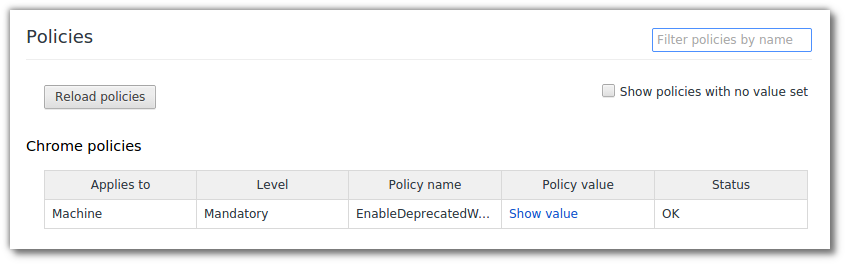
Once Chrome has been restarted, you can check if your new policy has been picked up by checking chrome://policy, something like this should be showing up:
If you have access to multicast television in your network (such as UNINETT’s IPTV offer), and you’re running Ubuntu’s «Uncomplicated Firewall» aka. ufw, you’ll find that you’re unable to actually watch any of the channels. Here’s how you can adjust your firewall to receive the UDP multicast traffic:
sudo ufw allow in proto udp to 224.0.0.0/4
sudo ufw allow in proto udp from 224.0.0.0/4
This will take care of the coming and going UDP packets, but you also need to allow IGMP packets through. I haven’t found any command to make this change, so instead, you need to open up the file
/etc/ufw/before.rules
and add the following lines somewhere before the COMMIT line:
# allow IGMP
-A ufw-before-input -p igmp -d 224.0.0.0/4 -j ACCEPT
-A ufw-before-output -p igmp -d 224.0.0.0/4 -j ACCEPT
Now you can reload the firewall and you should be able to watch that glorious multicast IPTV.
Oppdatert 25. desember: jeg har strøket ut det jeg fikk til jul, bortsett fra det jeg alltid ønsker meg: whisky og klem.
“I’ve come up with a set of rules that describe our reactions to technologies:
1. Anything that is in the world when you’re born is normal and ordinary and is just a natural part of the way the world works.
2. Anything that’s invented between when you’re fifteen and thirty-five is new and exciting and revolutionary and you can probably get a career in it.
3. Anything invented after you’re thirty-five is against the natural order of things.”
– Douglas Adams, The Salmon of Doubt